Every AI creator has a prompt graveyard. Scattered across clipboard history, Discord messages, text files, and half-remembered keywords, the prompts that produced your best work sit alongside hundreds of variations that did not work. The prompt engineering market is projected to reach $1.52 billion in 2026, yet most creators still manage their prompts by copying and pasting into text files. Numonic's Prompt Library changes that.
The Prompt Graveyard
The problem compounds with scale. At 100 images, you can remember what worked. At 1,000, you are guessing. At 10,000, you are effectively starting from scratch every session. Approximately 83% of creative professionals now use generative AI in their work, and Midjourney alone has nearly 20 million users. The volume of prompts produced across these tools is enormous, and almost none of it is being preserved systematically.
Most Digital Asset Management (DAM) systems ignore prompts entirely. They store the image but discard the creative intelligence that produced it. That is like archiving a photograph but throwing away the camera settings, the lens choice, and the notes about why you framed the shot that way. Numonic takes the opposite approach: every prompt is a first-class asset.
What the Prompt Library Does
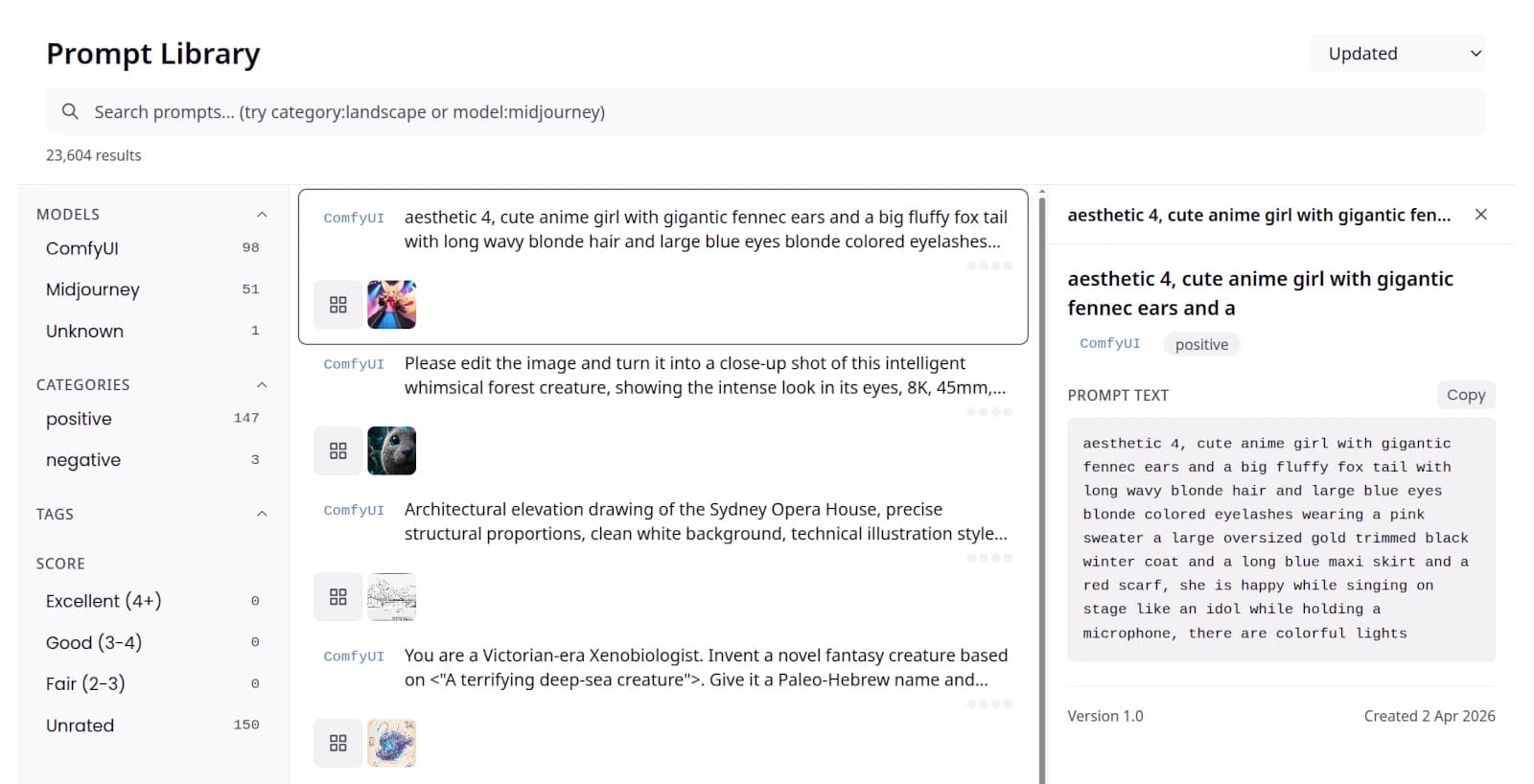
When you import assets into Numonic, whether through Smart Import, Connected Folders, or Desktop Sync, every prompt is extracted automatically and collected in a dedicated three-pane interface. The left panel filters by model and category. The center panel lists every prompt as a searchable, scrollable gallery. The right panel opens a detailed inspector when you select a row.
Each row in the gallery shows:
- The full prompt text (two-line preview, expanding on click)
- A model badge identifying the source tool (ComfyUI, Midjourney, etc.)
- Thumbnails of every asset generated from that prompt, each linking directly to the asset in the Gallery
- A positive or negative category label
Select any row to open the inspector, which displays the complete prompt text with a Copy button, version history, and creation date. The search bar supports structured queries like model:midjourney or category:landscape, so you can combine free-text search with precise filtering.
Prompt Library: Three-Pane Layout
Find Any Prompt in Seconds
With over 23,000 prompts in a typical library, browsing is not enough. The facet panel on the left side narrows results across two dimensions with live counts:
- Model — filter by AI tool (ComfyUI, Midjourney, or others) with real-time counts showing how many prompts match
- Category — separate positive prompts from negative prompts instantly
Filters combine naturally: selecting “Midjourney” and “positive” instantly surfaces only your positive Midjourney prompts. A single “Clear all filters” button resets everything. The search bar adds another layer, accepting both free-text queries and structured grammar like model:midjourney to pinpoint exactly what you need.
What Is Next
The Prompt Library is the foundation. Coming soon: an AI Prompt Optimizer that offers three strategies to improve any prompt (parameter sweep, semantic expansion, and negative prompt generation), each for 3 AI credits. We are also building out tag management, score-based filtering so you can rate and surface your best-performing prompts, and richer parameter extraction to show sampler, steps, and CFG values as inline chips. The infrastructure is in place; the experience is getting better with every release.
Key Takeaways
- Prompts are creative assets that deserve proper management, not clipboard ephemera
- The Prompt Library automatically collects every prompt from imported assets with thumbnails linking back to the generated images
- A three-pane layout with model filtering, structured search grammar, and a detail inspector makes any prompt findable in seconds
- AI-powered prompt optimization (parameter sweep, semantic expansion, negative prompt) is coming soon
Try the Prompt Library
Every prompt you have ever used, collected automatically, searchable instantly, and linked to the images it produced. Your prompts are part of your creative memory.
Explore the Prompt Library